
Blacksmith Master Discord: Official Invite, Dev Feedback & 1.0 Hub
Join the official Blacksmith Master Discord for 1.0 layout tips, bug reports read by solo dev Luka, and verified links to the wiki and Reddit.
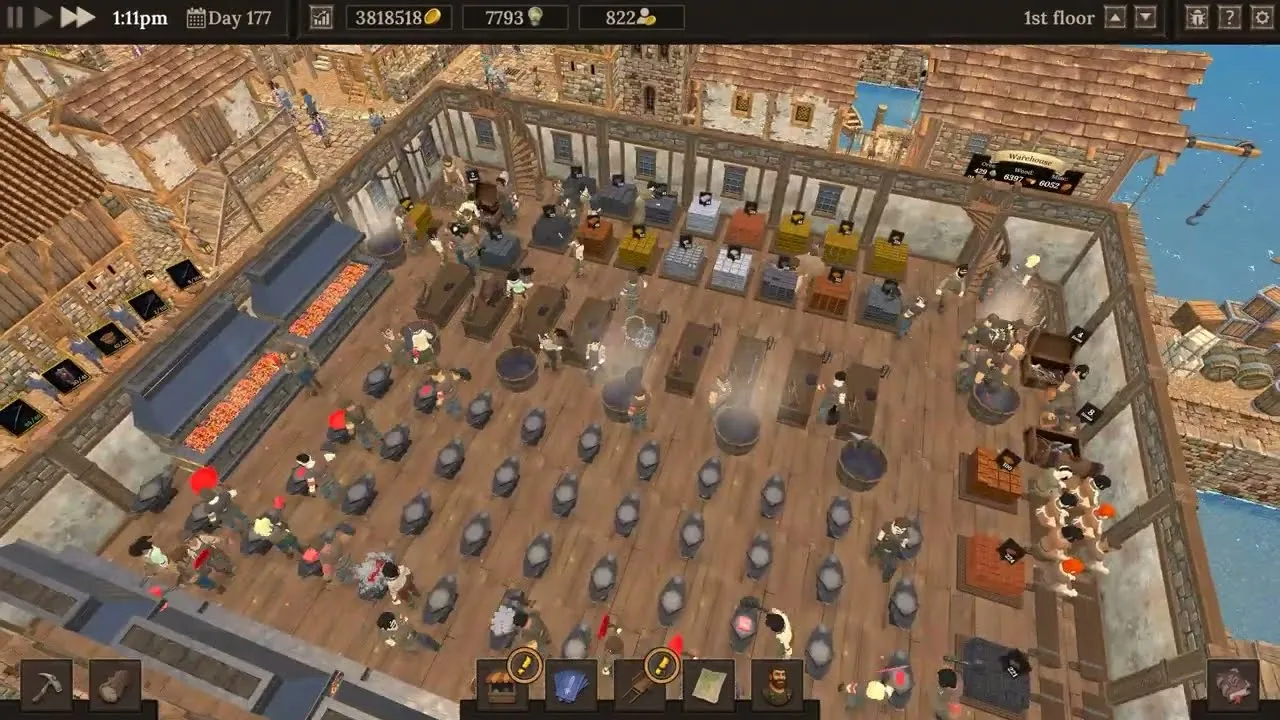
With the full 1.0 launch of Untitled Studio’s medieval smithy sim now live, the Blacksmith Master Discord has become the fastest place to trade multi-floor workshop layouts, troubleshoot production bottlenecks, and follow upcoming patches. Because Blacksmith Master is strictly a single-player management game, connecting with fellow smiths matters when you are scaling from a single anvil to complex 100-piece siege machines and Master Worker setups. Joining the official Blacksmith Master Discord also puts you in direct reach of solo developer Luka, who actively monitors community discussions to catch bugs and shape post-1.0 updates.
Whether you are migrating an Early Access workshop or hiring your first blacksmith after the November 19, 2026 launch, knowing where the official hubs live saves time and keeps you away from dead links. Below, you will find the verified invite link, every official companion resource, and a breakdown of how community input directly shaped version 1.0.
How to Join the Official Blacksmith Master Discord Server
You can join the community directly through the official Blacksmith Master Discord invite, which was published inside the November 19, 2026 Blacksmith Master 1.0 release announcement on Steam. Publisher Hooded Horse also operates a broader publisher Discord server, while this dedicated invite leads straight to players focused specifically on Blacksmith Master.
If you ever want to double-check the invite link yourself, open the official Blacksmith Master Steam store page and look at the official links panel, which lists Discord alongside Reddit, YouTube, X, Bluesky, Facebook, TikTok, Instagram, Bilibili, QQ, and LinkedIn. Individual internal channel names and server verification steps are managed inside Discord and are not detailed in the Steam release notes, so using the Steam-verified invite is the safest way to enter the server.
According to the 1.0 launch announcement, the server exists for three core community activities: chatting with fellow workshop managers, showcasing custom smithy builds, and checking out what other players are forging. If you prefer searchable guides or slower forum threads alongside live chat, several official companion hubs cover those needs.
| Official Resource | Primary Purpose | Best Used For |
|---|---|---|
| Official Blacksmith Master Discord | Real-time community chat and showcase | Sharing workshop layouts, asking quick workflow questions, and submitting bug reports |
| Official Community Wiki | Publisher-hosted mechanics reference | Looking up structured game systems maintained by the community on Hooded Horse’s wiki |
| Official Steam Beginner’s Guide | Step-by-step onboarding reference | Getting an early smithy profitable and avoiding early production stalls |
| Official Subreddit (r/Blacksmith_Master) | Threaded community discussion | Reading update reactions, longer strategy write-ups, and multi-floor screenshots |
| Steam Store & Discussions Hub | Official patch notes and forums | Tracking version changelogs, leaving Steam reviews, and reporting technical issues |
Does the Developer Read Blacksmith Master Discord Feedback?
Yes. Solo developer Luka of Untitled Studio explicitly highlights both the Blacksmith Master Discord and the Steam forums as his main channels for reading bug reports and planning future updates. In the 1.0 release announcement, Luka also confirmed that hitting 1.0 is not the finish line—he intends to keep expanding and refining the game in post-1.0 updates driven by player feedback and Steam reviews.
Community reports from preview and Early Access players reflect that responsive loop. Based on player experience shared during preview playthroughs, players routinely compile detailed notes on everything from pacing across difficulty modes to small interface quirks, such as workshop sign naming still relying on text markup rather than a full graphical formatting bar.
Looking back across the Early Access cycle from May 15, 2025 to November 19, 2026 shows how consistently Untitled Studio tackled high-friction workflow complaints raised by the community. Nearly every major milestone update targeted either workshop congestion, staff micromanagement, or late-game economy depth.
| Update & Date | Core Mechanical Overhaul | Practical Workflow Impact |
|---|---|---|
| Update #05 (June 10, 2025) | Added 2- and 4-smith furnaces, compact 1x1 ingot storage, and simultaneous storage access | Eliminated queuing at ingot storage and ore crates while saving floor space |
| Update #06 (June 24, 2025) | Added 2- and 3-ingot smelters, unified resource restocking, and source/destination storage toggles | Streamlined assistant hauling routes and doubled miner carrying capacity with Stronger Miners |
| Update #08 (August 5, 2025) | Split blueprint design into the Scholar class with 6 workspace decor upgrades and adjacent-table collaboration | Freed blacksmiths to focus on forging while scaling rarity costs 4x per tier (100 to 6,400 points) |
| Update #09 (August 19, 2025) | Replaced fixed Mastery Tree shield prices with a single active crafting milestone goal | Allowed flexible progression paths, such as rushing mines or advanced metalworking |
| Update #10 (October 5, 2025) | Introduced 5-level Ducat Minting (1 small ingot to 1 ducat, up to 3 large ingots to 25 ducats) | Created an endgame upgrade economy for mines, forests, trade routes, and cost cuts |
| Update #11 (November 18, 2025) | Added Relaxed, Normal, and Hard difficulties plus Custom Item Prices with 2x demand elasticity | Let players switch difficulty anytime and tune shop pricing (+10% price drops demand 20%) |
| Update #13 (February 23, 2026) | Launched the 5-factor Worker Happiness system and smarter assistant chest prioritization | Happy staff level faster and disable negative traits; severely unhappy staff can quit |
| Update #14 & #15 (July–August 2026) | Added manual shop closing, salary/progression rebalances, and Staff menu list view with multi-edit | Made large workshops far easier to restock, reorganize, and manage in bulk |
When posting feedback or a bug report in the Blacksmith Master Discord, stick to verifiable details that help a solo developer reproduce the issue quickly:
- State your current game version (1.0 or an older migrated save) and active difficulty setting (Relaxed, Normal, or Hard).
- Describe the exact production step or staff assignment involved, such as smelter source/destination toggles, assistant chest routing, or custom pricing adjustments.
- Mention whether the issue affects an existing Early Access save or a fresh 1.0 workshop.

Blacksmith Master - Part 25 - Jewelry Expansion
General game footage used as fallback media. This is not a keyword-specific tutorial or device benchmark; use the cited references for factual claims.
What Players Share and Optimize in the 1.0 Community
Much of the current conversation on the Blacksmith Master Discord revolves around the endgame systems introduced in the Blacksmith Master 1.0 preview and full release. Version 1.0 expanded late-game production far beyond simple weapons and kitchen utensils, giving build-focused players new puzzles to solve together.
| Version 1.0 Feature | Official Scope | Why It Sparks Community Strategy |
|---|---|---|
| Master Workers | 6 unique types, capped at 1 of each (Blacksmith, Assistant, Scholar, Miner, Lumberjack, Cashier) | Each unlocks a distinct late-game capability, from Tier 3 smelters and gem mining to 80/150-slot woodpiles and infinite checkout patience |
| Siege Machines | 5 multi-part projects unlocked via special merchant orders after hiring the Master Blacksmith | Each build requires over 100 individual pieces, testing multi-floor logistics and smelting throughput |
| Set Items | 12 collections with 3 items each (36 new craftable items total) | Unlocked via mystery blueprints earned by completing siege machine orders |
| Item Tiers & Blueprints | Items scale from Common to Mythic; Master Scholar unlocks the 5th blueprint upgrade tier | Pushes higher-tier material sourcing and high-output Scholar floors |
| Random Events | Positive and negative events affecting metrics like customer count or hiring costs | Forces flexible cash reserves and smart timing when expanding staff |
| Pathfinding & QoL | Free-angle NPC movement (replacing 45-degree steps), Ultra 6x speed, and customer-only doors | Improves crowd flow, boosts performance, and lets players separate shopper traffic from hauling corridors |
Player experience from multi-floor workshops highlights several layout habits that frequently come up when smiths compare builds. Many players move ore storage and smelting lines into the basement right beside warehouse access doors, keep the ground floor split between active anvils and a customer storefront with display racks and cashiers, and dedicate an upper floor to Scholars surrounded by productivity upgrades like plants, carpets, lighting, schematic scrolls, bookshelves, and chalkboards.
Community reports also emphasize careful role assignment once your staff roster grows. Because blacksmiths cannot split a single composite item between two different workers, leveling both metalworking and carpentry matters on hybrid items, while placing finished-item chests nearby ensures assistants—not your highest-level smiths—spend time walking to merchant carts and shop displays. On Normal and Hard modes, where maximum worker levels are capped lower than in Relaxed mode, comparing trait rolls and happiness setups with other Discord members helps you neutralize negative traits and keep leveling speeds high.
Platforms, Save Compatibility, and Single-Player Community Context
Before jumping into the Blacksmith Master Discord looking for co-op partners, note one key detail from the official Steam store page: Blacksmith Master is a single-player game with no multiplayer or co-op modes listed. The server functions as a strategy, troubleshooting, and showcase hub rather than a matchmaking lobby.
The game is also available across multiple PC ecosystems, so players from different storefronts share the same community spaces. Steam officially supports Windows, macOS, and Linux, while the official GOG store listing confirms DRM-free availability alongside Steam, Epic Games Store, and Xbox on PC. For returning Early Access owners, the 1.0 Steam announcement confirms that all Early Access saves carry over seamlessly into version 1.0 with no restart required.
| Category | Verified 1.0 Details | Official Source |
|---|---|---|
| Release Dates | Early Access: May 15, 2025; Full 1.0 Launch: November 19, 2026 | Steam Store Page |
| Storefronts & OS | Steam (Windows, macOS, Linux); DRM-free on GOG; also Epic Games Store and Xbox on PC | Steam Store Page and GOG Store Page |
| Pricing (US) | $19.99 standard; 50% launch discount to $9.99 listed through December 3 | Steam Store Page |
| Mode & Saves | Single-player only; Steam Cloud supported; all Early Access saves compatible with 1.0 | Steam Store Page and 1.0 Release Post |
| Controls & Portability | Steam Deck Playable; mouse-and-keyboard focus with Mouse Only Option; no controller support tag on Steam | Steam Store Page |
| Accessibility & Extras | 72 Steam Achievements, 17 interface/subtitle languages, Adjustable Difficulty, Adjustable Text Size, Save Anytime, Camera Comfort, Custom Volume Controls | Steam Store Page |
Blacksmith Master Discord FAQ
How do I join the official Blacksmith Master Discord?
Use the verified Blacksmith Master Discord invite link shared in the November 19, 2026 version 1.0 Steam announcement. You can also reach the same official link from the social links section on the game’s Steam store page.
Does the developer actually read suggestions and bug reports on Discord?
Yes. Solo developer Luka (Untitled Studio) explicitly identifies the Blacksmith Master Discord and the Steam discussions hub as his primary places for reviewing bug reports and gathering ideas for future post-1.0 updates.
Can I use the Discord server to find multiplayer or co-op partners?
No. According to official Steam store metadata, Blacksmith Master is a single-player experience with no multiplayer or co-op mode. Players use the server to share multi-story shop layouts, discuss siege machine production chains, and compare management strategies.
Where should I look if I want written guides instead of Discord chat?
Hooded Horse hosts the Official Blacksmith Master Community Wiki for mechanics reference, and the 1.0 announcement also links directly to the Official Steam Beginner’s Guide and the r/Blacksmith_Master subreddit for structured threads.
Related guides: Mods & Nexus Guide · Save File Location · Best Layout Guide · Community & Mods Hub
Related Articles
community
Blacksmith Master Mods Guide (1.0): Nexus Tools & Vanilla Options
Check Blacksmith Master mods status in 1.0, popular Nexus Mods QoL tools, BepInEx update risks, and built-in vanilla features worth using.
community
Blacksmith Master Reddit: Official Subreddit & 1.0 Community Builds
Find the official Blacksmith Master Reddit hub at r/Blacksmith_Master, explore 1.0 build discussions, and use official wiki and Steam guides.
crafting
Blacksmith Master All Item Sets: How to Unlock All 12 Sets in 1.0
Learn how Blacksmith Master all item sets unlock in 1.0: all 12 sets (36 items), Master Blacksmith Siege Machine orders, and blueprint upgrades.
Was this helpful?
Thanks for the feedback!