
Blacksmith Master Decoration Bonus: Shop & Scholar Room Upgrades
Learn how the Blacksmith Master decoration bonus boosts customer traffic, scales per rack, and differs from Scholar room upgrades in version 1.0.
Decorating your smithy is not just cosmetic busywork—understanding the Blacksmith Master decoration bonus directly controls how many shoppers walk through your doors every day. Many players place a few banners or lanterns, expand their display racks, and wonder why daily foot traffic stalls or why their Scholars still crawl through blueprint research. Getting the Blacksmith Master decoration bonus right matters even more after the full Blacksmith Master 1.0 release on Steam on November 19, 2026, which brings new Master Workers, Random Events, and higher-tier merchandise to Windows, macOS, and Linux via Steam alongside DRM-free PC availability on GOG, Epic Games Store, and Xbox on PC.
How the Blacksmith Master Decoration Bonus Works in Your Shop
Once you unlock retail sales, opening a functioning shop requires three essentials: a Checkout Counter, a hired Cashier, and Goods Racks stocked by your blacksmiths and assistants. According to the official Blacksmith Master Beginner’s Guide on Steam, your store tracks a daily Customer Attraction figure in the Shop Overview panel. That attraction rating is driven by three combined levers: your total number of racks, the variety of distinct items on display, and your shop decorations.
Player experience from Early Access gameplay provides a clearer look at how the Blacksmith Master decoration bonus scales as your showroom grows. Community reports note that filling the decorations progress bar at the top of the screen unlocks up to a +75% customer bonus, significantly increasing the number of shoppers arriving each day. However, that target is not static. Based on player experience, adding any new display rack—regardless of rack type or item value—raises the decorations bar requirement by 500 coins.
Because every new rack pushes the threshold higher, community guides recommend placing paintings, banners, lights, and plants so your decorative coverage keeps pace with or exceeds your active merchandise racks. Keep in mind that those exact +75% and 500-coin benchmarks come from Early Access player experience; the official November 2026 version 1.0 announcements do not confirm whether those underlying numbers were adjusted for launch, so always check your live in-game decorations bar after expanding.
| Shop Element | Role in Retail Attraction | Source Basis |
|---|---|---|
| Goods Racks | Hold crafted stock and contribute to base attraction; each new rack raises the decoration target by 500 coins in Early Access testing | Official Beginner’s Guide & Early Access player experience |
| Distinct Items | Displaying a broader variety of item types increases daily Customer Attraction | Official Beginner’s Guide |
| Shop Decorations | Fill the store’s decorations bar—up to a +75% customer bonus in Early Access reports—to draw more daily visitors | Official Beginner’s Guide & Early Access community reports |
| Merchant Offer Rewards | Primarily pay gold, but occasionally award extra shop decorations alongside blueprints and elite staff | Official Beginner’s Guide |
| Cashier Specializations | Improve customer purchase probability and willingness to wait in checkout lines | Official Beginner’s Guide |
You can acquire most decor directly through the Construction menu, which includes dedicated tabs for decorations and lights, floor decorations, and wall or floor designs. Use X and Z to rotate items before placement, and leave clear access tiles wherever a fixture requires open space in front of or beneath it. Watch Merchant Offers as well, since special contracts occasionally grant unique decorations without dipping into your shop treasury.
Retail Decorations vs. Scholar Room Upgrades and Staff Seating
One of the easiest traps in Blacksmith Master is assuming every decorative object feeds the same meter. In reality, your smithy uses three distinct room-enhancement systems—and only one of them powers the retail Blacksmith Master decoration bonus.
In Update #8: Scholars and Design Table Rework, blueprint research moved off Blacksmiths and onto a dedicated Scholar class with three stats: walking speed, design speed, and collaboration bonus. That overhaul introduced six specific design space upgrades—including plants, light, chalkboards, and bookshelves—that Scholars actively interact with to accelerate Design Point output. The official Beginner’s Guide highlights that Scholar workspaces benefit far more from lights, bookshelves, and dedicated decor than other production stations, and these upgrades work cleanly in compact rooms because Scholars barely need to walk.
To push research speed even further, place two design tables adjacent to each other to activate the Scholars’ collaboration bonus. Meanwhile, worker rest furniture belongs to a completely separate system added in Update #13: Staff Management Improvements. Upgrading benches and seating options improves the five-factor Worker Happiness system (alongside working hours, salary bonus, job security, and food and drinks), helping motivated staff level up faster and disable negative traits rather than boosting shopper traffic.
| System | Target Area | Confirmed Examples | Primary Gameplay Effect |
|---|---|---|---|
| Retail Decorations | Shop floor | Paintings, banners, lights, plants, floor and wall designs | Raises shop attractiveness and daily Customer Attraction |
| Scholar Design Space Upgrades | Scholar design room | 6 upgrades including plants, light, chalkboards, and bookshelves | Actively used by Scholars to increase Design Point generation |
| Staff Seating Options | Workshop rest areas | Multiple bench and seat choices | Raises Worker Happiness to speed leveling and disable negative traits |
Even though Scholar upgrades do not fill your retail bar, the two systems directly reinforce each other. Design Points upgrade blueprint rarity tiers, which raises the selling price of every item placed on your shop racks. Combining high-tier blueprints with a strong Blacksmith Master decoration bonus means more daily customers browsing higher-margin gear.
| Blueprint Rarity Upgrade | Design Point Cost | Notes |
|---|---|---|
| Common to Uncommon | 100 Design Points | Confirmed in Update #8 (4x scaling per tier) |
| Uncommon to Rare | 400 Design Points | Confirmed in Update #8 |
| Rare to Epic | 1,600 Design Points | Confirmed in Update #8 |
| Epic to Legendary | 6,400 Design Points | Confirmed in Update #8 |
| 5th Upgrade Level (1.0) | Not specified in official notes | Unlocked by hiring the Master Scholar in version 1.0 |
Note that the exact per-item percentage boost of each Scholar upgrade—and the full roster of all six upgrade names beyond plants, light, chalkboards, and bookshelves—is not published in the official patch notes, nor is the exact Design Point cost of the new fifth upgrade tier introduced in 1.0.

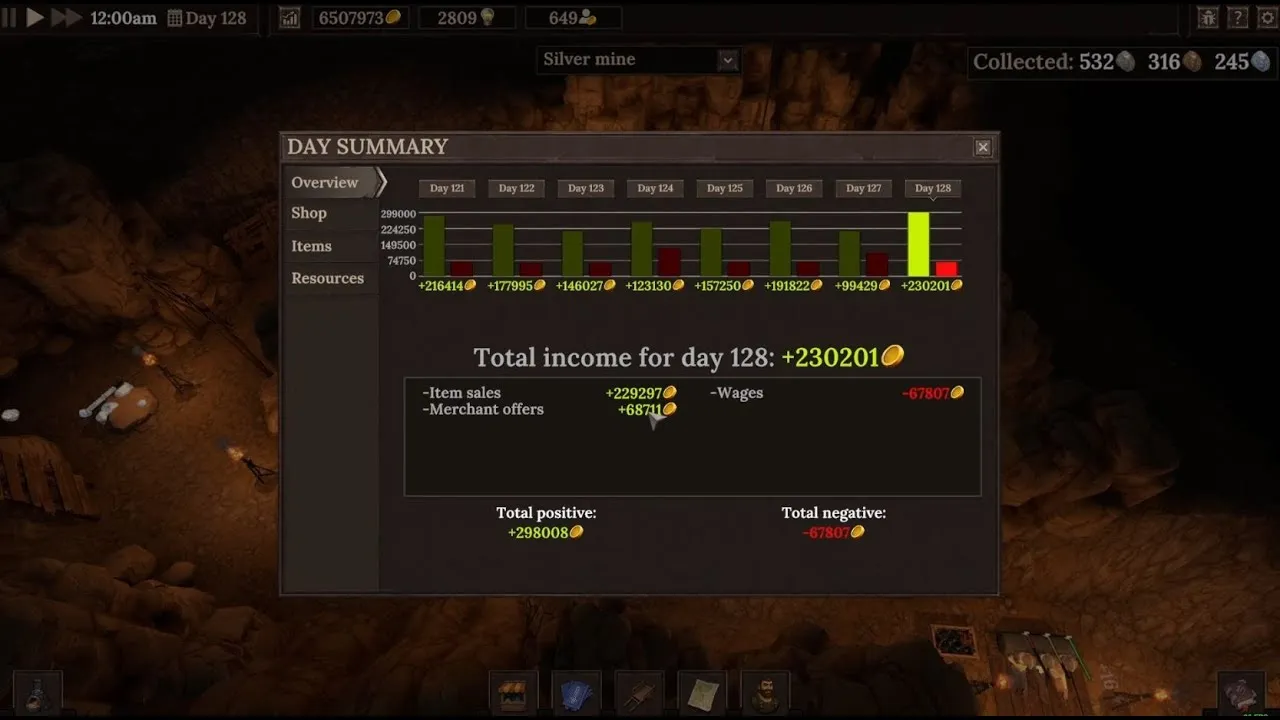
Blacksmith Master│How I Reach $6 MILLION$ GOLD ( NO MODS ) Mid Game - Full Guide 2025 — Dj Dragon
General game footage used as fallback media. This is not a keyword-specific tutorial or device benchmark; use the cited references for factual claims.
Optimizing Shop Layouts Around the Decoration Bonus in 1.0
Pulling extra shoppers into your store only translates into profit if customers actually buy items and check out without losing patience. Pairing the Blacksmith Master decoration bonus with smart floor planning prevents your upgraded foot traffic from turning into clogged aisles and angry walkouts.
Group Similar Stock and Track Purchase Data
According to player experience, placing items from the same category next to one another—such as grouping weapons together, clustering tools together, or even setting two identical bows side by side—raises purchasing probability. A shopper who declines one piece may inspect the neighboring item and buy it instead. To test whether your layout works, open the chart icon at the top of the screen and view the Shop tab, where a graph compares total items considered against items considered specifically because they were near similar goods.
Take Advantage of Version 1.0 Retail Tools
Version 1.0 and late Early Access updates give shop managers much stronger layout control, as outlined in the Blacksmith Master 1.0 Preview and preceding patch notes:
- Separate shoppers from production: Use version 1.0 customer-only doors and multi-floor stairs so buyers stay inside your decorated showroom while smelters, raw ore, and forging benches run undisturbed on other floors.
- Pause traffic during remodels: Manually close the shop (added in Update #14) whenever you want to reorganize racks, add new decorations, and restock displays cleanly.
- Monitor queue times: Under Settings -> Indicators, player experience highlights enabling the waiting indicator to see how long customers wait in line, and toggling off rack indicators if icons clutter your decorated showroom.
- Buffer against price swings and events: Custom item prices (Update #11) apply a 2x demand elasticity—raising prices by 10% cuts demand by 20%—while 1.0 Random Events can temporarily lower customer visits, making a filled decoration meter a practical safety net.
- Customize signboards cleanly: Player experience notes that clicking the question mark beside signboard text reveals formatting options (bold, italic, underline, and size controls), plus icon insertion using
<sprite=NUMBER>tags.
| Version 1.0 Feature | How It Supports a Decorated Retail Shop | Limit / Availability |
|---|---|---|
| Customer-Only Doors | Keeps customer foot traffic isolated inside your decorated retail zone | Standard 1.0 build option |
| Free-Angle Pathfinding | Replaces 45-degree movement increments so crowds navigate smoothly around racks and decor | Automatic for all NPCs in 1.0 |
| Master Cashier | Prevents shoppers from ever losing patience while waiting at the register | Limit 1 per smithy in 1.0 |
| Master Scholar | Unlocks the 5th blueprint upgrade level, raising retail sale prices on your racks | Limit 1 per smithy in 1.0 |
| Random Events | Can reduce customer visits or alter costs, rewarding high baseline attraction | Active gameplay system in 1.0 |
Common Mistakes That Hurt Your Blacksmith Master Decoration Bonus
Even experienced managers accidentally undercut their own Blacksmith Master decoration bonus when scaling into mid- and late-game workshops. Watch out for these avoidable missteps:
- Adding too many racks at once: Expanding your display count before budgeting for matching decor drops your bar percentage (player experience reports each rack adds 500 coins to the bar target). Replace lower-quality stock with upgraded items of the same type before building extra racks.
- Blocking interaction tiles: The official Beginner’s Guide warns that furniture and fixtures have distinct space requirements. Cramped decorative pieces placed directly in front of racks or benches can disrupt worker and shopper flow.
- Confusing Scholar decor with retail decor: Hanging paintings on the shop floor will not speed up blueprint research, and cramming bookshelves into a distant retail corner does not help Scholars who actively use upgrades inside their own design space.
- Ignoring cashier capacity: Boosting daily arrivals without adding checkout counters, upgrading cashier skills, or hiring the 1.0 Master Cashier creates long queues and angry customers.
- Relying blindly on Early Access math: Because version 1.0 rebalanced progression and added Item Tiers from Common to Mythic, always verify your actual live bar fill and Day Summary numbers rather than assuming every Early Access figure remained identical.
Frequently Asked Questions
How does the Blacksmith Master decoration bonus calculate customer increases?
Officially, daily Customer Attraction depends on your number of racks, distinct items displayed, and shop decorations. Early Access player experience indicates that filling the top decorations bar provides up to a +75% customer bonus, with every added rack raising the required decoration value by 500 coins. Because the 1.0 patch notes do not confirm whether those exact figures changed, verify the bar directly in your current save.
Do retail decorations also boost Scholar Design Point generation?
No. Retail decorations raise shop attractiveness for visiting buyers, whereas Scholars rely on six dedicated design space upgrades—including plants, light, chalkboards, and bookshelves—introduced in Update #8. Scholars actively use those upgrades inside their workspace and gain an additional collaboration bonus when two design tables sit adjacent.
Where can I get more decorations for my shop in Blacksmith Master?
You can buy decorations, lights, floor decorations, and wall or floor designs directly from the Construction menu. In addition, completing Merchant Offers occasionally rewards shop decorations alongside gold, new blueprints, and elite workers.
Did the Blacksmith Master 1.0 update change how shop layouts and customers work?
Yes. Version 1.0 added customer-only doors, smoother free-angle NPC pathfinding, Random Events that can alter customer counts, Common-to-Mythic Item Tiers, and unique Master Workers including the Master Cashier (who eliminates register impatience) and Master Scholar (who unlocks the fifth blueprint upgrade tier). All Early Access saves remain compatible with version 1.0.
Related guides: Best Layout Guide · How to Use Warehouse · Source vs Destination · Workshop Layouts Hub
Related Articles
community
Blacksmith Master Discord: Official Invite, Dev Feedback & 1.0 Hub
Join the official Blacksmith Master Discord for 1.0 layout tips, bug reports read by solo dev Luka, and verified links to the wiki and Reddit.
community
Blacksmith Master Mods Guide (1.0): Nexus Tools & Vanilla Options
Check Blacksmith Master mods status in 1.0, popular Nexus Mods QoL tools, BepInEx update risks, and built-in vanilla features worth using.
community
Blacksmith Master Reddit: Official Subreddit & 1.0 Community Builds
Find the official Blacksmith Master Reddit hub at r/Blacksmith_Master, explore 1.0 build discussions, and use official wiki and Steam guides.
Was this helpful?
Thanks for the feedback!