
Blacksmith Master Design Table Bonus Guide: Collaboration, Upgrades, and Layouts
Learn how every Blacksmith Master design table bonus stacks across Scholar collaboration, plants, carpets, and lighting to earn Design Points faster.
Upgrading blueprints from Common to Legendary in Blacksmith Master demands thousands of Design Points, and leaving your Scholars at bare desks will stall your shop’s profits for weeks. Understanding how each Blacksmith Master design table bonus works is the difference between inching through a single recipe upgrade and steadily elevating your entire catalog. Since Update #8 overhauled research and version 1.0 expanded late-game progression, every Blacksmith Master design table bonus operates across two separate systems—room-wide Total Bonus upgrades and individual Scholar collaboration—that combine to dramatically accelerate research when your study is planned properly.
Why Design Table Bonuses Matter After Update #8 and 1.0
Before August 2025, Blacksmiths doubled as researchers, and blueprint upgrade costs only doubled at each rarity tier. That changed permanently with the official Update #8 Scholars and Design Table overhaul, which separated blueprint research into a dedicated Scholar worker class and raised rarity upgrade scaling from a 2x multiplier to a 4x multiplier per step.
Under the current 4x scaling, pushing a single item from Common to Legendary costs 8,500 Design Points instead of 1,500. Developer Luka noted in that announcement that a basic four-worker team generating 200 Design Points per day would need 42.5 in-game days for just one blueprint—impractical when the game features roughly a hundred blueprints. Optimizing your Blacksmith Master design table bonus is therefore not optional filler; it is the primary progression lever built to offset that steeper curve.
| Rarity Upgrade Tier | Pre-Update #8 Cost | Update #8 Through 1.0 Cost | Cost Multiplier Change |
|---|---|---|---|
| Common → Uncommon | 100 Design Points | 100 Design Points | Unchanged base tier |
| Uncommon → Rare | 200 Design Points | 400 Design Points | 2x higher than old cost |
| Rare → Epic | 400 Design Points | 1,600 Design Points | 4x higher than old cost |
| Epic → Legendary | 800 Design Points | 6,400 Design Points | 8x higher than old cost |
| Total (Common → Legendary) | 1,500 (7.5 days at 200/day) | 8,500 (42.5 days at 200/day) | 4x scaling per tier |
| 5th Upgrade Level (1.0) | Unavailable | Unlocked via Master Scholar | Exact point cost not listed in preview |
That pressure grows even further in full release. According to the Blacksmith Master 1.0 preview announcement ahead of the November 19, 2026 launch, version 1.0 introduces the Master Scholar (limit one per shop), who unlocks a fifth upgrade tier for all blueprints to boost sale prices once more. Combined with 36 new Set Item blueprints rewarded by Siege Machine orders, a well-tuned study pays dividends across your entire playthrough.
Total Bonus vs. Adjacent Collaboration Bonus Explained
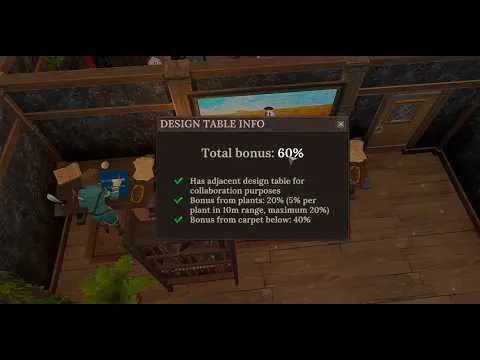
One of the most common points of confusion in Blacksmith Master happens right after players place two Design Tables side by side. The desk panel confirms that the workstation “has adjacent design table for collaboration purposes,” yet the Total Bonus percentage displayed at the top of the table does not budge.
Community reports and player experience explain why: those two bonuses live on completely different layers. The Total Bonus counter at the top of a Design Table only tracks unlocked environmental upgrades from your skill tree, such as plants, carpets, and lighting. Meanwhile, placing two Design Tables next to each other triggers an individual Collaboration Bonus tied directly to the Scholar assigned to that desk.
| Bonus Layer | Where It Displays | How to Trigger It | What Determines the Value |
|---|---|---|---|
| Table Total Bonus | Top of the Design Table panel | Unlock room upgrades and place matching decor in range | Additive sum of active room upgrades on that table |
| Adjacent Collaboration Bonus | Individual Scholar stat panel | Place another Design Table directly adjacent | Skill points invested in that Scholar’s Collaboration Bonus |
Because Scholars track three core stats—Walking Speed, Design Speed, and Collaboration Bonus—two Scholars sitting at adjacent desks can receive different collaboration percentages. Player experience shows individual Scholars earning 10% or 12% extra Design Points from the exact same adjacent desk setup depending on how many level-up points were placed into their Collaboration Bonus stat. In short, you want both layers active simultaneously: pair tables together for personal Scholar synergy, then layer room upgrades on top to push the desk’s Total Bonus higher.

Blacksmith Master│How TOTAL BONUS Works For SCHOLAR Design Table - Guide 2026 — Dj Dragon
Every Room Upgrade and Furniture Bonus for Design Tables
Official Update #8 notes confirm that players can unlock six different design-space upgrades to make a Scholar room more inspiring, explicitly naming plants, lighting, chalkboards, and bookshelves. Importantly, several of these upgrades are not purely passive decorations—Scholars actively interact with them during the workday to maintain higher productivity.
Player experience from 2026 gameplay testing breaks down the exact mechanics and additive stacking for three of those skill-tree upgrades, showing how each Blacksmith Master design table bonus behaves when placed in a working study:
- Natural Inspiration (Plants): Placing decorative plants within a 10-meter range of a Design Table grants a +5% bonus per plant. In player experience, unlocking this perk capped each table at +20% (four plants in range), although the pre-unlock tooltip text in that footage mentioned a 25% maximum—so verify the live cap in your 1.0 skill tree. Distance is measured strictly per table: plants still count across an interior wall if they sit within 10 meters, whereas a desk slightly farther away may only pick up two plants (+10%) until you add greenery closer to it.
- Warm and Focused (Carpets): Putting carpets directly underneath a Design Table grants a +40% bonus. Community reports show this stacking additively with Natural Inspiration: laying carpets under desks that already had a 20% plant bonus immediately lifted every desk’s Total Bonus to 60%.
- Bright Ideas (Lighting): Keeping Design Tables well lit with light fixtures placed around the workspace grants a +50% bonus once unlocked. Combined with the 20% plant cap and 40% carpet boost demonstrated in player experience, these three environmental perks alone add up to a 110% Total Bonus.
| Upgrade or Room Item | Source Basis | Reported Bonus Effect | Placement Rules & Confirmed Details |
|---|---|---|---|
| Natural Inspiration (Plants) | Official (plants) + Player experience | +5% per plant; 20% cap observed after unlock (25% shown pre-unlock) | Must sit within 10 m of each table; counts through walls |
| Warm and Focused (Carpets) | Player experience | +40% Total Bonus | Place carpet directly beneath each Design Table; stacks additively |
| Bright Ideas (Lighting) | Official (lights) + Player experience | +50% Total Bonus | Place lights near desks so tables stay well lit |
| Chalkboards | Official Update #8 | Boosts Scholar productivity (exact % unconfirmed in sources) | Actively used by Scholars during workdays |
| Bookshelves | Official Update #8 & Beginner’s Guide | Boosts Scholar productivity (exact % unconfirmed in sources) | Actively used by Scholars; fits compact study rooms well |
| Remaining 2 Upgrades | Official Update #8 | Part of 6 total design-space upgrades (names & % unconfirmed) | Check in-game unlock tree for complete 1.0 details |
While chalkboards, bookshelves, and two additional unnamed perks round out the six official upgrades introduced in Update #8, exact percentage bonuses and interaction timers for those remaining items are not specified in the supplied patch notes or walkthroughs. Treat the 110% figure from plants, carpets, and lighting as the verified baseline from community reports rather than an absolute ceiling.
Optimal Scholar Room Layout and Staffing Tips for 1.0
Getting the highest return from every Blacksmith Master design table bonus depends as much on floor planning and workforce management as on unlocking perks. According to the official Blacksmith Master Beginner’s Guide on Steam, Scholar spaces gain disproportionately strong value from decor like lights and bookshelves compared to other workstations—and because Scholars do not haul ores or finished blades across your smithy, they thrive in tight, compact rooms.
Grouping Design Tables tightly accomplishes three goals at once. First, every table stays adjacent to at least one neighbor so every Scholar’s Collaboration Bonus remains active. Second, a compact cluster lets four shared plants cover every desk within their 10-meter radius while a single strip of carpets and overhead or wall lighting blankets the entire row. Third, once you build stairs and unlock upper floors, dedicating a quiet floor or walled wing—paired with version 1.0’s customer-only doors and smoother free-angle NPC pathfinding—keeps Scholar trips to bookshelves, chalkboards, and rest benches short.
When placing furniture in Construction mode, use X and Z to rotate desks and double-check underneath and front clearance so carpets seat cleanly beneath each table. Beyond layout, several official staff mechanics directly shape how fast your Scholars generate Design Points:
| Management Area | Recommended Setup | Gameplay Impact |
|---|---|---|
| Desk Grouping | Place Design Tables in adjacent pairs or rows | Ensures every Scholar triggers Collaboration Bonus |
| Room Footprint | Use a compact room or dedicated upper floor | Maximizes shared 10 m plant coverage, lighting, and shelf access |
| Difficulty Scaling | Prioritize Design Speed & Collaboration on Normal/Hard | Lower max worker level caps prevent maxing every stat |
| Worker Happiness | Balance hours, salary bonus, job security, seating, and food/drinks | Speeds up leveling, disables negative traits, and prevents quits |
| Hiring & 1.0 Master | Replace weak early hires via list view; hire Master Scholar (limit 1) | Controls wage bloat and unlocks the 5th blueprint upgrade tier |
Difficulty settings from Update #11 deserve special attention. On Relaxed, Scholars can eventually max out every stat, but Normal and Hard cap maximum worker levels lower—forcing you to match stat investments (Design Speed versus Collaboration Bonus) to each Scholar’s traits. Pair that with Update #13’s five-factor Happiness system and Update #15’s Staff menu list view so motivated Scholars level faster, drop their negative trait, and avoid quitting while you save gold for better multi-trait candidates and the 1.0 Master Scholar.
Frequently Asked Questions
Why is my adjacent table collaboration bonus not showing in Total Bonus?
Based on community reports and player experience, the Total Bonus percentage at the top of a Design Table only calculates unlocked environmental upgrades like plants, carpets, and lighting. Adjacent collaboration is tracked individually on each Scholar’s own stat sheet (scaling with their invested Collaboration Bonus points), while the table panel simply confirms that an adjacent desk is present.
Do walls block the Blacksmith Master design table bonus from plants?
No. Player experience confirms that plants within the 10-meter radius still apply their +5% Natural Inspiration bonus even when a wall separates the plant from the Design Table. However, distance is checked individually for every table, so desks positioned farther from your greenery may show a lower percentage until you place additional plants closer to them.
How high can the Blacksmith Master design table bonus stack?
In player experience, unlocking Natural Inspiration (+20% from four nearby plants), Warm and Focused (+40% from carpets underneath), and Bright Ideas (+50% from lighting) stacks additively to a 110% Total Bonus per desk—on top of each Scholar’s individual adjacent Collaboration Bonus. Official Update #8 mentions six total design-space upgrades (including chalkboards and bookshelves), though exact percentage values for the remaining upgrades are not confirmed in the available source notes.
Did Blacksmith Master 1.0 change Design Table bonuses or require a new save?
Official Steam announcements confirm that version 1.0 launched on November 19, 2026 with full Early Access save compatibility, keeping Update #8’s Scholar and Design Table overhaul intact. Version 1.0 makes Design Point optimization even more important by introducing the Master Scholar (who unlocks a fifth blueprint upgrade tier), 36 new Set Item blueprints from Siege Machines, and free-angle NPC pathfinding that improves Scholar movement around study rooms.
Related guides: All 12 Item Sets · Tier 3 Smelters · Level 5 Blueprints · Crafting & Blueprints Hub
Related Articles
community
Blacksmith Master Discord: Official Invite, Dev Feedback & 1.0 Hub
Join the official Blacksmith Master Discord for 1.0 layout tips, bug reports read by solo dev Luka, and verified links to the wiki and Reddit.
community
Blacksmith Master Mods Guide (1.0): Nexus Tools & Vanilla Options
Check Blacksmith Master mods status in 1.0, popular Nexus Mods QoL tools, BepInEx update risks, and built-in vanilla features worth using.
community
Blacksmith Master Reddit: Official Subreddit & 1.0 Community Builds
Find the official Blacksmith Master Reddit hub at r/Blacksmith_Master, explore 1.0 build discussions, and use official wiki and Steam guides.
Was this helpful?
Thanks for the feedback!